
Supported guest Wi-Fi hardware and architecture
RM-WiFi integrates with commercial networking hardware using industry-standard protocols. There is no proprietary hardware lock-in and no requirement to replace functioning access points.
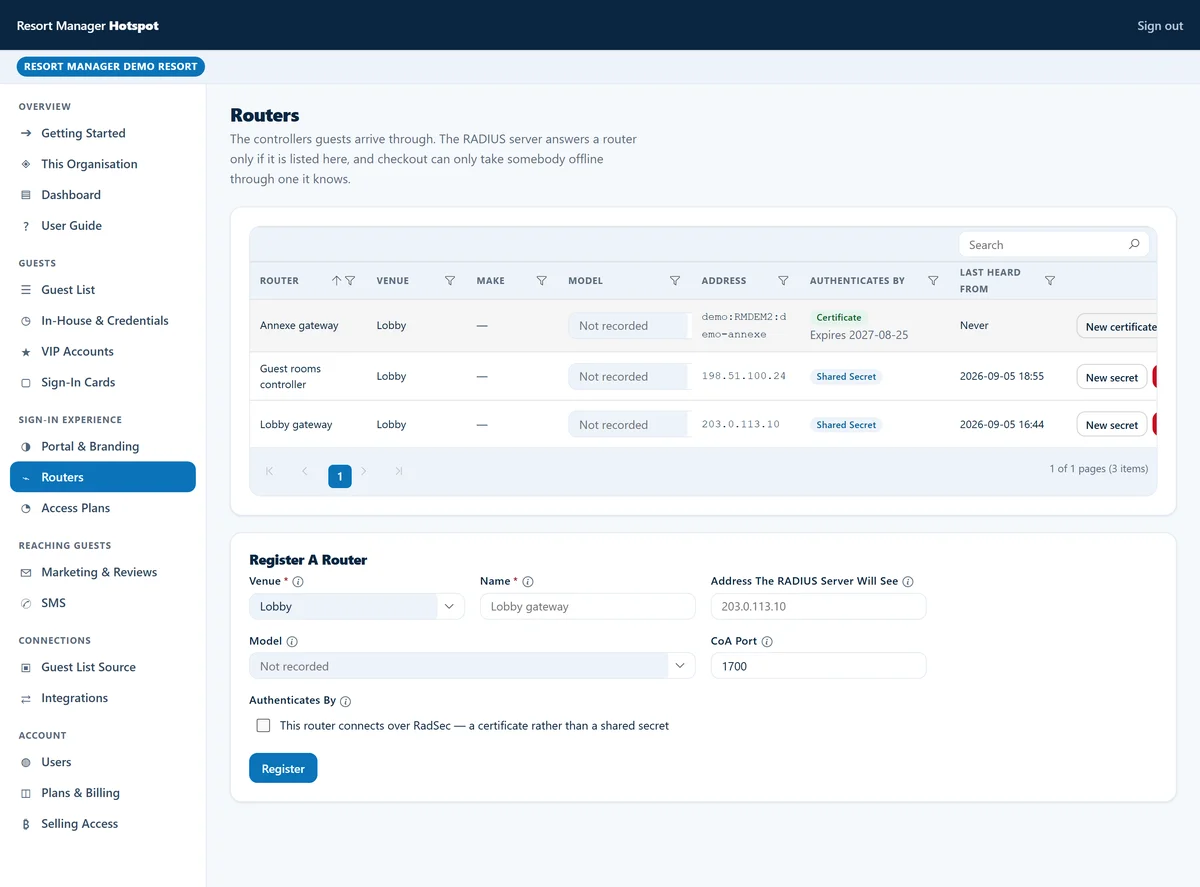
Every venue receives a personalised, copy-paste setup guide directly inside the RM-WiFi management console — or you can opt for a pre-configured plug-and-play gateway router delivered ready to plug into your modem.
Console-generated per-venue setup guides (or plug-and-play router)
Rather than publishing generic static server hostnames or requiring you to edit command-line scripts by hand, the RM-WiFi management console generates a tailored configuration guide for each venue you add.
When you select your router or controller model inside the RM-WiFi console, it renders your venue's exact RADIUS and portal endpoints, unique per-venue credentials, and ready-to-apply configuration steps:
- Per-venue console onboarding
- Open the RM-WiFi console, choose your hardware platform (MikroTik RouterOS, Ubiquiti UniFi, or TP-Link Omada), and follow the generated step-by-step guide or paste the pre-filled provisioning script.
- Optional pre-configured plug-and-play gateway router
- If you prefer not to touch router settings at all, we can ship a pre-configured gateway router outright at cost plus shipping (yours to own with no hardware loan return traps — or 1 included free, shipping only, on annual prepay Hotel plans). Simply plug it into your internet modem and existing access points.
Core captive portal architecture
RM-WiFi operates as a cloud-hosted captive portal platform decoupled from on-property wireless hardware. Communication between edge network hardware and RM-WiFi relies on standardised network protocols:
- RADIUS Authentication (RFC 2865)
- Network gateways and wireless controllers forward client authentication requests to your venue's assigned RM-WiFi RADIUS endpoint over UDP port 1812 (or encrypted RadSec over TLS on TCP port 2083).
- RADIUS Accounting (RFC 2866)
- Gateways stream session lifecycle packets (Start, Interim-Update, Stop) to RM-WiFi over UDP port 1813 to track session durations, allocated IP addresses, and byte counts.
- HTTPS Redirection
- Unauthenticated web requests intercept at the gateway or controller layer and redirect to your venue's hosted login portal or custom property domain.
- Change of Authorisation (CoA RFC 3576 / RFC 5176)
- RM-WiFi transmits inbound Disconnect Messages (DM) or controller API deauthorisations so guest Wi-Fi access ends at PMS check-out after a short grace period.
Walled garden requirements
Unauthenticated client devices must reach specific external hosts before completing portal authentication. Your venue's console-generated setup guide lists the exact pre-authorisation access rules (walled garden) required for your configuration:
- Authentication endpoints
- Unrestricted access to your venue's assigned RM-WiFi portal hostname (displayed in the console) and any configured custom property domain across TCP ports 80 and 443.
- Single sign-on providers
- Unrestricted access to Google identity endpoints and Apple ID endpoints where social single sign-on is enabled for your venue.
- Captive Network Assistant (CNA) rule
- Operating system connectivity probe domains (such as Apple, Android, and Windows captive probe URLs) must never be added to the walled garden. Whitelisting probe URLs suppresses the automatic login prompt on guest smartphones.
Supported hardware vendor guides
Read our architectural overviews for each supported networking platform before opening your per-venue setup wizard in the RM-WiFi console:
- MikroTik RouterOS
- Complete edge routing control supporting native RouterOS 6 and 7 hotspot profiles, RADIUS accounting, and incoming CoA disconnects. Read the MikroTik RouterOS overview.
- Ubiquiti UniFi
- External captive portal integration for UniFi Network Application v7, v8, and v9 on UniFi OS consoles and self-hosted controllers. Read the Ubiquiti UniFi overview.
- TP-Link Omada
- Omada SDN hardware, software, and cloud controllers running external portal redirection and Hotspot Operator API authorisation. Read the TP-Link Omada overview.
Selecting hardware for your venue
Hardware recommendations depend on venue scale, cabling infrastructure, and operational requirements:
- Cafés, bars, and boutique venues
- A single MikroTik gateway router (available pre-configured from us or using your existing router) handles routing, DHCP, firewalling, and captive portal redirection on one compact device.
- Villas and boutique hotels
- Ubiquiti UniFi or TP-Link Omada ceiling-mounted access points paired with a UniFi/Omada controller or a MikroTik gateway router provide seamless roaming across rooms, pools, and dining areas.
- Resorts and multi-building estates
- High-throughput MikroTik Cloud Core Routers (CCR) or controller-managed UniFi and Omada networks deliver VLAN isolation, fair-use bandwidth tiers, and reliable coverage across large properties.
Clear subscription plans, or a tailored quote for your property.
See our published monthly rates for RM-WiFi, RM-Tables, RM-CRM, RM-Desk and Resort Manager Flex on our Pricing page, or tell us how many rooms and outlets you run and which add-on modules you need for a tailored proposal.